Prob: Building a Local Temperature Sensor with micro:bit, Bluetooth, and a Dashboard
Language: EN | Lire en français
Introduction
For some time now, I have been increasingly interested in embedded systems and smart sensors. When you think about it, a huge amount of data is produced in our environment but is never captured, stored, or analyzed.
However, as soon as you start working with embedded systems, you realize that it is not that simple. Many constraints must be considered: hardware, power consumption, connectivity, robustness, visualization, and so on.
For this project, the objective was deliberately simple: build an initial local, autonomous, and low-cost data-acquisition solution capable of collecting measurements from a sensor, storing them cleanly, and displaying them in a small dashboard accessible over the local network.
The real goal was to discover the constraints involved in a sensor project. For that reason, this article focuses more on the problems encountered and the solutions implemented than on the code or the final architecture, although all the source code is available in my GitHub repositories.
Methodology and Tools
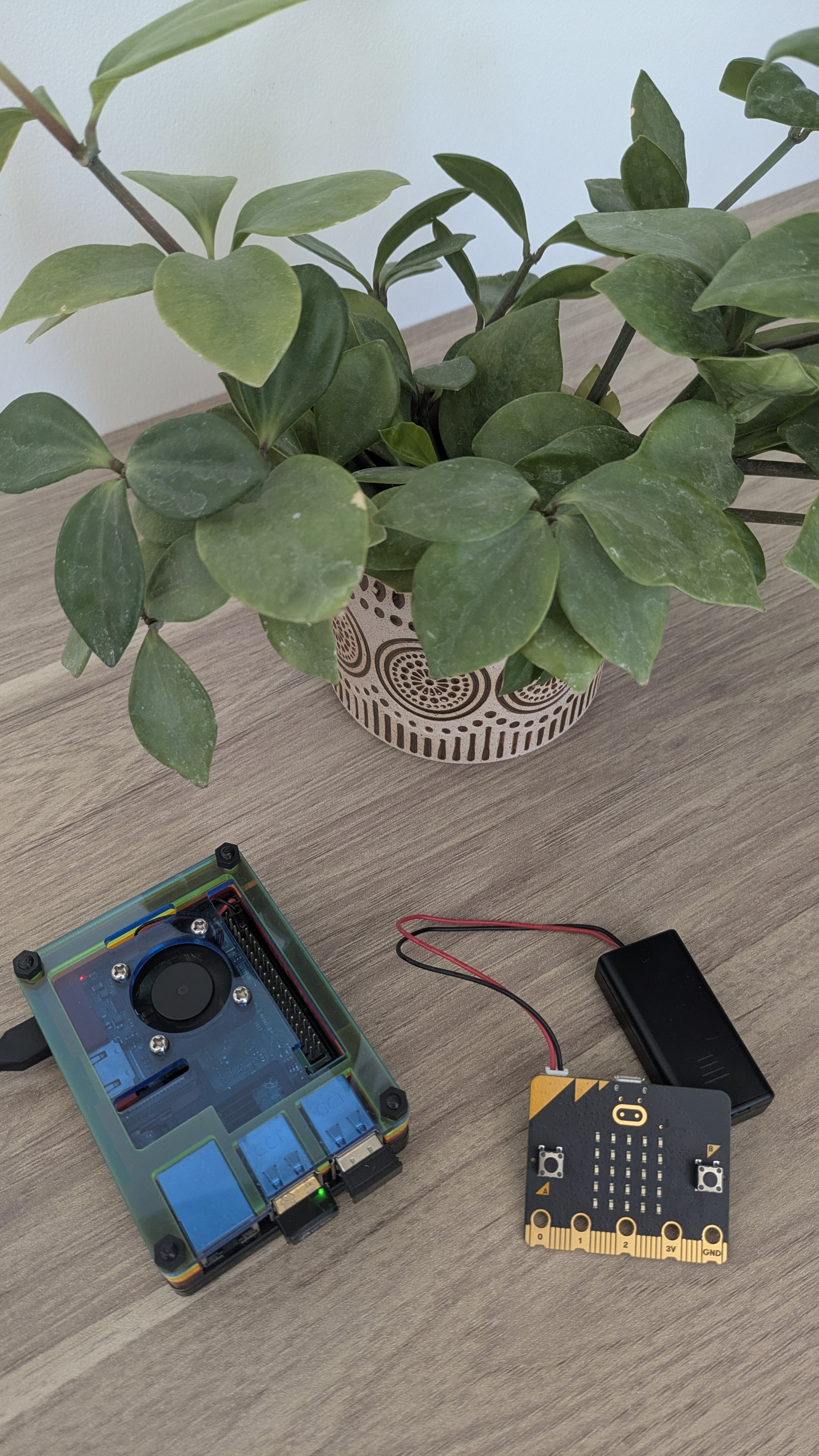
For this project, I used hardware that I already had available. It may not have been the most suitable choice, but one of the goals was also to reuse equipment that was no longer serving any purpose: in this case, a Raspberry Pi 3 Model B+ and a micro:bit v2.
To move the project forward, I used the following resources and tools:
- The micro:bit documentation for the sensor and Bluetooth components, as well as the official Raspberry Pi website:
BBC micro:bit Bluetooth Profile
Bluetooth Low Energy protocol stack
Raspberry Pi computer hardware
- ChatGPT 5.5 Thinking through the ChatGPT application, for documentation research, solution exploration, and code generation. I reviewed and modified the AI-generated code so that it matched my coding patterns and habits.
General Architecture
The current solution is based on three main components.
1. The Sensor
The sensor is built around a micro:bit v2 powered by two AAA batteries.
It periodically measures temperature and ambient light, then exposes the data over Bluetooth Low Energy.
The sensor has a simple identifier, for example:
The goal is to make it possible to deploy several sensors later, each with its own identifier.
Its operation remains intentionally minimal:
- periodically wake up;
- read the temperature and ambient light level;
- expose or send the value over Bluetooth;
- return to a low-power state whenever possible.
2. The Raspberry Pi
The Raspberry Pi 3 Model B+ acts as the local server.
It collects the data transmitted by the sensor over Bluetooth and stores it in CSV files.
The choice of CSV is deliberate. It is not the most elegant long-term solution, but it is robust, human-readable, easy to debug, and compatible with virtually every Python tool.
At this stage of the project, I prefer a simple and observable solution.
The Raspberry Pi therefore acts as:
- a Bluetooth collector;
- local storage;
- a local web server;
- the access point for the dashboard.
3. The Local Dashboard
The dashboard is a small Python application accessible over the local network.
It displays:
- the sensor status;
- the most recently received temperature;
- the measurement history;
- a small chart;
- filtering by period or day.
The micro:bit Sensor
Below is the micro:bit code currently deployed on the sensor. It has already been optimized for lower power consumption and only exposes its Bluetooth connection every five minutes after waking from deep sleep.
#include "MicroBit.h"
#include "MicroBitUARTService.h"

using namespace codal;

MicroBit uBit;
static MicroBitUARTService *sensorUart;

// -----------------------------------------------------------------------------
// Sensor configuration
// -----------------------------------------------------------------------------
#define DEVICE_ID           "T01"
#define DEBUG_LED           1           // 1 = small visual indicator, 0 = no LED
#define SLEEP_INTERVAL_MS 300000 // 300,000 = 5 min.

// Time window during which the micro:bit is visible over BLE
#define BLE_WINDOW_MS              20000
// Repeat BLE transmission every 2 seconds
#define BLE_SEND_EVERY_MS          2000

static int seq = 0;

static void blink_debug()
{
#if DEBUG_LED
    uBit.display.image.setPixelValue(2, 2, 80);
    uBit.sleep(100);
    uBit.display.image.setPixelValue(2, 2, 0);
#endif
}

static ManagedString make_payload()
{
    seq++;

    int temp_c = uBit.thermometer.getTemperature();
    // Turn off the LED matrix so that it does not affect the light measurement.
    uBit.display.clear();
    uBit.sleep(50);
    int light = uBit.display.readLightLevel();

    // micro:bit v2 microphone: deliberately left at 0 in this V0.
    // First validate BLE -> Raspberry Pi -> CSV, then add the correct CODAL sound API.
    int sound = 0;

    ManagedString payload =
        ManagedString(DEVICE_ID) +
        "," + ManagedString(seq) +
        "," + ManagedString((int)system_timer_current_time()) +
        "," + ManagedString(temp_c) +
        "," + ManagedString(light) +
        "," + ManagedString(sound) +
        "\n";

    return payload;
}

static void send_measurement(ManagedString payload)
{
    // Send data through the Bluetooth UART service.
    // If no BLE central device is connected, this V0 does not block.
    // The Raspberry Pi can connect and receive the lines periodically.
    sensorUart->send(payload);

    // Optional, very short visual indication.
    blink_debug();
    uBit.sleep(BLE_SEND_EVERY_MS);
}

static void advertise_and_send_window()

{
    ManagedString payload = make_payload();

    // Make the micro:bit visible and connectable over BLE.
    uBit.bleManager.advertise();
    uint64_t start = system_timer_current_time();
    while ((system_timer_current_time() - start) < BLE_WINDOW_MS)
    {
        // If the Raspberry Pi is connected and subscribed to the UART service,
        // it will receive the line. If nobody is connected,
        // send() does not block for a significant amount of time.
        send_measurement(payload);
    }
    // Stop BLE advertising after the time window.
    // If no Raspberry Pi connected, the micro:bit becomes invisible again.
    uBit.bleManager.stopAdvertising();
}

static void go_to_sleep()
{
    // Visually turn off the LED matrix.
    uBit.display.clear();
    // Deep sleep for lower power consumption.
    uBit.power.deepSleep(SLEEP_INTERVAL_MS);
}

int main()
{
    uBit.init();

    uBit.display.print("S");
    uBit.sleep(1000);
    uBit.display.clear();

    // micro:bit BLE UART service.
    // TX/RX buffers large enough for short CSV lines.
    sensorUart = new MicroBitUARTService(*uBit.ble, 64, 64);

    uBit.display.print("B_A");
    uBit.sleep(1000);
    uBit.display.clear();

    while (true)
    {
        advertise_and_send_window();
        go_to_sleep();
    }

    release_fiber();
}
To test the Bluetooth configuration, it is essential to temporarily remove the long micro:bit deep-sleep interval and make it transmit every five seconds. This makes it possible to verify that the micro:bit is detected by the Raspberry Pi and that the data is received correctly.
Simply change the value of SLEEP_INTERVAL_MS as shown below.
From:
To:
The Raspberry Pi Server
To communicate with the micro:bit, the project uses Bluetooth Low Energy (BLE). The micro:bit exposes a BLE service through which it sends the temperature and ambient-light measurements. The Raspberry Pi uses the bleak library to scan for and connect to the micro:bit, then receive the transmitted values.
The first step is to determine the micro:bit's MAC address. For this, we use a BLE scanning script that lists all nearby devices. Once the MAC address is known, the Raspberry Pi can connect to the micro:bit and receive its data.
src/prob/scan_microbit_verbose.py
import asyncio
from bleak import BleakScanner

MICROBIT_UART_SERVICE = "e95d5400-251d-470a-a062-fa1922dfa9a8"

async def main():
    print("Scanning BLE devices for 15 seconds...")
    devices = await BleakScanner.discover(timeout=15, return_adv=True)

    found = []

    for address, (device, adv) in devices.items():
        name = device.name or adv.local_name or "UNKNOWN"
        rssi = adv.rssi
        service_uuids = [s.lower() for s in adv.service_uuids]

        is_microbit_uart = MICROBIT_UART_SERVICE in service_uuids

        found.append((rssi, name, address, service_uuids, is_microbit_uart))

    found.sort(reverse=True, key=lambda x: x[0])

    for rssi, name, address, services, is_microbit_uart in found:
        marker = " <-- MICROBIT UART ?" if is_microbit_uart else ""
        print(f"{rssi:4} dBm | {name:30} | {address}{marker}")

        if services:
            for s in services:
                print(f"          service: {s}")

asyncio.run(main())
MICROBIT_UART_SERVICE is the UUID that identifies the micro:bit's Bluetooth UART service.
Once the micro:bit's MAC address is known, the Raspberry Pi can connect to it and read the temperature and ambient-light values sent by the micro:bit as character strings.
import asyncio
import csv
from datetime import datetime
from pathlib import Path

from bleak import BleakClient, BleakScanner

TARGET_NAME = "BBC micro:bit"
TARGET_ADDRESS = "F8:B4:AB:35:89:E3"

# UUIDs actually exposed by the micro:bit
UART_TX_UUID = "6e400002-b5a3-f393-e0a9-e50e24dcca9e"  # micro:bit -> Raspberry Pi
UART_RX_UUID = "6e400003-b5a3-f393-e0a9-e50e24dcca9e"  # Raspberry Pi -> micro:bit

OUTPUT_DIR = Path("/home/pi/microbit_data")
OUTPUT_DIR.mkdir(parents=True, exist_ok=True)

SCAN_TIMEOUT_SECONDS = 20
READ_DURATION_SECONDS = 20
PAUSE_BETWEEN_CYCLES_SECONDS = 30
PAUSE_AFTER_ERROR_SECONDS = 10

buffer = ""


def log(message: str) -> None:
    print(f"{datetime.now().isoformat(timespec='seconds')} | {message}", flush=True)


def output_path() -> Path:
    return OUTPUT_DIR / f"microbit_{datetime.now().strftime('%Y-%m-%d')}.csv"


def ensure_header(path: Path) -> None:
    if not path.exists():
        with path.open("w", newline="") as f:
            writer = csv.writer(f)
            writer.writerow([
                "raspberry_timestamp",
                "device_id",
                "seq",
                "microbit_uptime_ms",
                "temperature_c",
                "light_level",
                "sound_level",
            ])


async def find_microbit():
    return await BleakScanner.find_device_by_filter(
        lambda d, ad: (
            d.address == TARGET_ADDRESS
            or (d.name is not None and TARGET_NAME in d.name)
            or (ad.local_name is not None and TARGET_NAME in ad.local_name)
        ),
        timeout=SCAN_TIMEOUT_SECONDS,
    )


async def collect_once() -> bool:
    global buffer
    buffer = ""

    log("Searching for the micro:bit...")
    device = await find_microbit()

    if device is None:
        log("micro:bit not found")
        return False

    log(f"Found: {device.name} {device.address}")
    log("Connecting...")

    received_lines = []

    def on_data(sender, data):
        global buffer

        text = data.decode("utf-8", errors="ignore")
        buffer += text

        while "\n" in buffer:
            line, buffer = buffer.split("\n", 1)
            line = line.strip()

            if line:
                received_at = datetime.now().isoformat(timespec="seconds")
                log(f"Received: {line}")
                received_lines.append((received_at, line))

    async with BleakClient(device, timeout=30.0) as client:
        log(f"Connected: {client.is_connected}")

        await client.start_notify(UART_TX_UUID, on_data)

        log(f"Reading for {READ_DURATION_SECONDS} seconds...")
        await asyncio.sleep(READ_DURATION_SECONDS)

        await client.stop_notify(UART_TX_UUID)

    if not received_lines:
        log("Connection succeeded, but no data was received.")
        return True

    path = output_path()
    ensure_header(path)

    with path.open("a", newline="") as f:
        writer = csv.writer(f)

        for received_at, line in received_lines:
            parts = line.split(",")

            if len(parts) != 6:
                log(f"Ignored, invalid format: {line}")
                continue

            device_id, seq, uptime_ms, temp_c, light, sound = parts

            writer.writerow([
                received_at,
                device_id,
                seq,
                uptime_ms,
                temp_c,
                light,
                sound,
            ])

    log(f"CSV written to: {path}")
    return True


async def main():
    log("Starting the micro:bit BLE logger")

    while True:
        try:
            await collect_once()
            log(f"Waiting {PAUSE_BETWEEN_CYCLES_SECONDS} seconds before the next cycle")
            await asyncio.sleep(PAUSE_BETWEEN_CYCLES_SECONDS)

        except Exception as e:
            log(f"Error: {type(e).__name__}: {e}")
            log(f"Waiting {PAUSE_AFTER_ERROR_SECONDS} seconds after the error")
            await asyncio.sleep(PAUSE_AFTER_ERROR_SECONDS)

if __name__ == "__main__":
    asyncio.run(main())
Now that the Raspberry Pi can scan for and connect to the micro:bit, retrieve the measurements, and store them in a CSV file, the next step is to automate data collection.
For this, we use systemd to create a service that starts the Python script automatically.
Create a systemd service file, for example /etc/systemd/system/microbit-ble-logger.service:
[Unit]
Description=Microbit BLE UART Logger
After=bluetooth.service network-online.target
Requires=bluetooth.service

[Service]
Type=simple
User=pi
WorkingDirectory=/home/pi/prob
ExecStart=/home/pi/.cache/pypoetry/virtualenvs/prob-P0AEL-Po-py3.9/bin/python /home/pi/prob/src/prob/read_microbit_uart.py
Restart=always
RestartSec=10
StandardOutput=journal
StandardError=journal

[Install]
WantedBy=multi-user.target
Then reload the systemd configuration and enable the service:
sudo systemctl daemon-reload
sudo systemctl enable microbit-ble-logger.service
sudo systemctl restart microbit-ble-logger.service
Problems Encountered
Bleak Version on Raspberry Pi
This is a minor issue, but I am mentioning it so that nobody wastes time on it.
If, like me, you are using a Raspberry Pi 3 Model B+ with a recent version of Raspberry Pi OS, Python 3.9 will probably be the newest version available to you. In that case, you will need to install bleak==0.21.1.
Wi-Fi and Bluetooth Contention
One of the first interesting problems I encountered was contention between Wi-Fi and Bluetooth.
On a Raspberry Pi, Wi-Fi and Bluetooth often share nearby radio resources. In practice, this can create unstable behavior when both are used at the same time:
- regularly scanning over Bluetooth;
- maintaining a stable SSH connection over Wi-Fi;
- serving a local dashboard;
- transferring files or debugging remotely.
In my case, the typical problem was:
While connected over SSH, the Raspberry Pi either failed to detect the micro:bit over Bluetooth or the Bluetooth scan failed altogether.
I diagnosed the issue by disabling Wi-Fi and testing Bluetooth scanning on its own with the following command:
This confirmed that the instability was caused by contention between the two wireless protocols.
Technical Choices Used to Stabilize the Solution
I happened to own an Archer T2U Nano USB Wi-Fi adapter, so I wondered whether I could use the Wi-Fi dongle to separate Wi-Fi and Bluetooth across two different interfaces.
After a few tests, I confirmed that this significantly stabilized the solution. I kept my SSH connection on the USB Wi-Fi adapter and disabled the Raspberry Pi's internal Wi-Fi interface so that Bluetooth could operate correctly.
And then, finally, the micro:bit appeared in the list of Bluetooth devices detected by the Raspberry Pi:
pi@raspberrypi:~/prob $ poetry run python src/prob/scan_microbit_verbose.py
Scanning BLE devices for 15 seconds...
...
-68 dBm | BBC micro:bit [totug] | F8:B4:AB:35:89:E3
...
The micro:bit data acquisition then succeeded:
Found: BBC micro:bit [totug] F8:B4:AB:35:89:E3
Connected: True
Reading for 20 seconds...
Received: T01,1,5021,23,128,0
Received: T01,2,10030,23,129,0
Received: T01,3,15041,23,130,0
CSV written to: /home/pi/microbit_data/microbit_2026-07-08.csv
Conclusion
The solution is still experimental and has many limitations, including:
- uncertain real-world battery life;
- Bluetooth robustness still needs to be tested in different environments;
- the micro:bit v2 is not necessarily the most suitable board for an autonomous sensor;
- multi-sensor management needs improvement;
- CSV storage may eventually need to be replaced with a local database;
- there is no automatic service monitoring yet.
However, connected temperature sensors are commonly sold for between €10 and €50. If your goal is to build your own sensor, understand the underlying technologies, and learn by doing, a €20 micro:bit v2 can provide a great deal of experimentation and enjoyment.